Digital security on personal computers is entering a new phase, as the foundational certificate that has supported the security of the Windows operating system for a decade is officially ending its life cycle. Microsoft has already started the process of transferring compatible devices to the modern framework, replacing the previous infrastructure and warning about the potential risks to those users who postpone installing the necessary system fixes.
On October 19, the validity of Microsoft Windows Production PCA 2011 expired - the key component that provided the Secure Boot function for millions of machines around the world. This essential protective barrier acts as a strict digital sentinel, verifying the authenticity and digital signatures of all boot elements before the operating system itself starts, effectively blocking the execution of unwanted or malicious code. The transition to the new set of certificates for 2023 marks the final phase of replacing the old standards, the terms of which have not yet expired.
The mere fact of the expiration of the current certificate will not lead to hardware failure or sudden shutdown of computers. Machines will continue to boot normally and function, but the lack of updated data deprives the system of critical components such as new versions of the Windows Boot Manager, updated Secure Boot databases, and updated signature revocation lists. Over time, this neglect can significantly erode protection against modern cyberthreats targeting the earliest phases of device boot.
To neutralize potential risks, the software giant distributes new certificates directly through the official Windows Update channel. For the majority of compatible configurations, the process is completely autonomous and does not require user intervention. However, within the Windows 10 operating system, this type of update reaches only devices that still have active support, including those covered by extended corporate ESU plans.
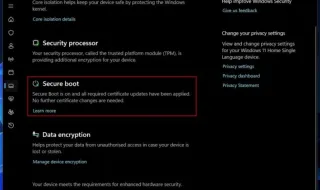
Each user can independently check the current status of protection through the system settings menu. The presence of a green checkmark confirms the successful installation of the necessary certificates, while indications of an outdated configuration require immediate application of all pending system updates and a subsequent restart of the computer. If yellow or red warning signals appear, the likely cause is outdated firmware or a software blocker, which requires visiting the official website of the motherboard manufacturer to install the latest UEFI version. Before such manipulation, experts strongly advise saving the BitLocker encryption recovery key.
Any attempts to manually disable Secure Boot as a temporary solution to the problem are categorically not recommended. After a computer switches to the new bootloader, the subsequent return to the function with old certificates will inevitably generate critical errors at startup. Since the large-scale distribution of certificates is carried out in stages, the full completion of the process may require several consecutive reboots, with the final verification best done in the specialized security section of the operating system.