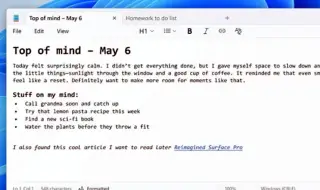
Microsoft has updated Windows Notepad, adding basic formatting to the iconic text editor. The application now offers bold, italics, hyperlinks, lists, headings, and even Markdown, all accessible via a new toolbar at the top of the window. The update is already being tested in the Canary and Dev channels for Windows 11.
As explained by Dave Grochoki, a lead project manager at Microsoft, the new version of Notepad supports direct Markdown work. Switching between a visual display of text and the Markdown source code, which allows you to format text, converting it to HTML or PDF, is available via the View menu or the corresponding button in the status bar. At the same time, users can still completely disable formatting if they want to work in the classic text version.
This update is the latest in a series of changes that began a week ago with testing of the AI Write function, which generates text based on a user request, and together these innovations significantly bring Notepad closer to the functionality of Microsoft Word. Interestingly, for decades the program remained a simple editor, mainly for viewing log files and creating text files, and now Notepad, thanks to artificial intelligence technology, can write instead of the user.